homeaboutresourceslinkscontributorscontact
Showing posts with label blogging. Show all posts

Thursday, 11 February 2016

Digital: Promoting your student artwork!

Art education and the use of social media has caused a bit of a stir lately but, for my department it really has made a difference in our students (and potential new students!) engagement and possibilities within Fine Art. This academic year has been the most challenging and rewarding of my teaching career so far and through the more difficult times I have been fortunate enough to gain continuous CPD through the Facebook group of NSEAD. It really is a fantastic resource and teachers from up and down the country are sharing inspiring ideas, resources and examples of excellence every single day. This site made me think about the new digital age and how it is now more relevant than ever to be seen and heard online. Social media really has made a massive difference in the promotion of my course and more importantly, made a significant impact on my students knowledge within the arts!

So, wondering where you start?

Branding:
First things first - create a brand for yourselves! It is important for your students and others to recognise who you are and establish a connection. I created our own identity by making a logo and selecting a colour and font that would work best for us. We use our logo for everything - from signs around the department, open day events, taster sessions, briefs for students, social media sites, icons on emails, competitions such as the Saatchi, publicity for Reps, etc. It really does make a massive impact in drawing attention as to who we are as a department and highlighting attention to our students work.


Lastly, make your own tag so people can start locating your work and identifying you on multiple sites. Ours is fsfcfineart - we even have our own hashtag: #fsfcfineart!

Flickr:
Some of you may remember Claire's wonderful series of posts on 'digital tools'. The blog gives you a real snapshot of what ticks our boxes in the world of digital media and how you can use it yourself to make your students learning experience more exciting. For us, Flickr was where everything began and we find it fab for sharing past/present work with our students and they can access it both at home and in college.


Additionally, you can create your own albums to categorise styles of artworks or split between year groups, final pieces and preparatory work. It also saves on time in taster sessions and instead of creating a PPT of student examples you can play your Flickr page on a continuous slide show to inspire learners. We even use it for Open day events and end of year exhibitions to create a real buzz within the department!

Pinterest:
This is old news nowadays but if you haven't got it - do! Pinterest really is the most incredible resource for the visual arts and students respond to it really well. On our Pinterest board we have created over 60 boards of artists and techniques that make us tingle with excitement and our students use the site successfully to share ideas and to inspire one another. Pinterest has allowed us to network with fellow teachers, students, businesses and galleries around the world and as a department we have over 1000 followers. 


We have also made our own YBA (Young British Artist) board to showcase students work that we are a teeny bit envious of. It has been up and running for less than 6 months and already has nearly 700 followers. The images pinned are from our portfolio of student work on our Flickr page and additionally gives our students the possibility of building employability links and being contacted by potential artists and galleries interested in their work. It also lets our followers see who and what we are and helps build networking opportunities and relationships with brands such as Fujitsu.


Instagram:
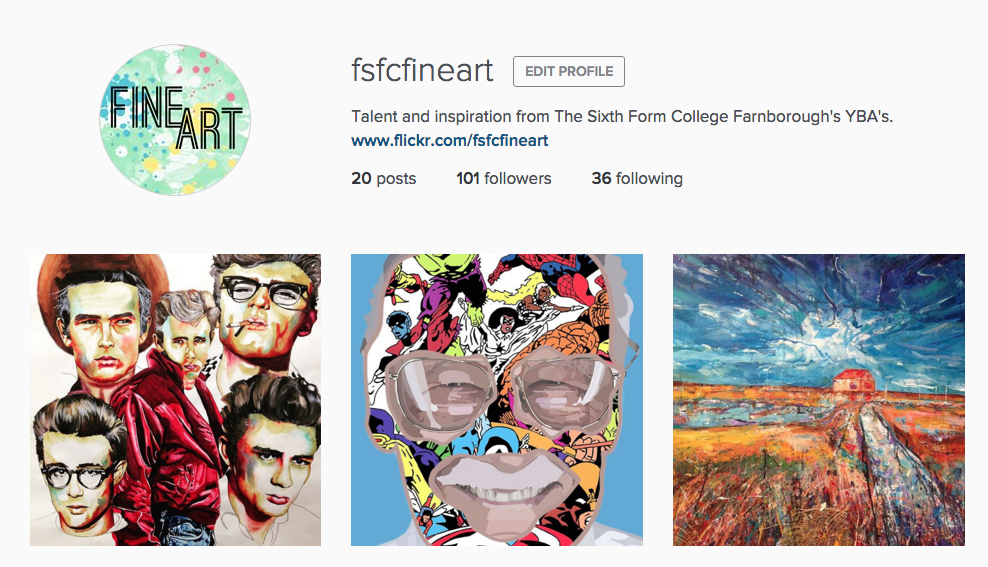

Instagram was initially recommended by one of my students and after a few discussions in class I found that several of my students were already using the social media site for their own publication of artwork and gaining huge successes from it. About three weeks ago, I decided to try a new digital venture for the department and since launching our own page we already have over 100 followers. Our students have responded positively to the site and many have followed us - checking daily to see new ideas from fellow students in both AS and A2. Through hashtags we have been able to create an online following and draw attention to what we want people to look at. For example: #fsfcfineart, #studentartwork #expressivepainting, etc. Our page has also enabled us to find new artists and follow galleries for inspiring artwork for our students. Our students can then click on what we 'like' and within the past week some students have already approached me through our online signposting for artist research!


It makes me incredibly proud to see my students receive the attention they deserve and even prouder to see them independently critique and compliment one another's artwork. In turn, this positive praise gives my students more confidence within the classroom and successfully introduces them to new initiatives and links within the art world.

Now, I won't lie.. the above does take time and we try to post on each social media site at least once a week to keep our audience happy. All of the above sites have an App and once set up it is pretty quick to post something from your phone and access it without a computer. We even have our own QR codes within the classroom for students to access in lessons and we publicise these also on our course leaflets and next to paintings around the college (linking back to our Flickr account).


We'd love to digitally interact with other educational institutions so if you use a digital tool for the promotion of your student artwork then let us know by either following us or leaving a comment on the end of this blog post!
- Kirsty ❤

Thursday, 26 July 2012

digital: digital tools we love, part II

Okay so today is all about blogging! If you're wanting to start a blog from scratch there is tons of helpful tutorials and guidance out there as well I'm sure as debates about the best way to do things and the best platform to use but at the end of the day it's what you feel comfortable with and what works for you! We were familiar with blogger, having used it ourselves, and so we went with that! If you want to use blogger and feel like you want some help getting started I'd watch bloggers tutorials for the simple basic bits and then head over to Pugly Pixel for some awesome tutorials for customising templates and so on, if you want to get into that!  

So what do we actually use blogs for? I mentioned briefly some of what we do in part I, but what I want to discuss today is lesson blogs. We have lesson blogs for each class which we use to post lesson by lesson content, so by the end of the year we'll have a whole course worth of posts. What's great about it is although the first year you're starting from scratch, in the second year you can simply re-post or edit what's already there! It's also a godsend if you're starting to teach a new course as the resources are right there. It's also brilliant in terms of quality assurance if you are delivering the same course twice (we always have at least 2 Graphics classes for example!) as you know that both groups are getting the same provisions, even if they might have a different teacher! It also means you can divide up the work load and share resources really easily! 

For the students it means they can access all the resources easily, even if they miss a class and they can refer back to resources, tutorials, tasks etc. at a later date if needed. It also provides them with more interactive resources, you can share everything from worksheets and articles to high quality image and video. Extending learning has also become easier as you can provide extension tasks easily, be it a little article, an extra tutorial or technique or simply additional artists/designers for students to look at. Students can also comment on posts meaning they can get in touch anytime - this could be for extra help or as part of a discussion, we've used commenting as a way of gathering some learner voice feedback for some of our projects. 

We set our lesson blogs to private so only ourselves and our students can access them, we like it this way as it becomes our and our students own little space and we don't have to worry about spam comments and so on! Obviously though it's not terribly exciting for me to talk about lesson blogs without showing you them - so I've made a short video which talks you through a couple of our lesson blogs so you can find out more about how we use them....


So that's a bit about blogging! If you want to catch up on previous posts you can check out part I, here.
- Claire ❤

Monday, 23 July 2012

digital: digital tools we love, part I

what we use in our department: flickr, pinterest, you tube and blogger

I'm a huge fan of digital 'tools' as I find they tend to be things which make my life easier and as a wonderful addition, make my students learning experience more exciting. Over the next few weeks my posts are all going to be 100% focused on digital, I'm going to discuss the stuff that has revolutionised my (teaching) life to give an insight into what I (and colleagues!) do and how it works and also to show how easily you can start using these things yourself! So to kick start the digital focus I'm going to run through the easy to access stuff that you can whizz over and check out. 

Our departments journey into the digital world began with blogging. I turned up eager, excited, new to teaching and a long term blogger and thought hey! let's do this! It was received initially with a kind of hesistance but has thankfully evolved into a key part of our department used by staff and students alike. In a moment which I can only retrospectively describe as sheer craziness I created separate course blogs for each course (we had 6 at one point!) upon realising that was a bit nuts, I merged all 6 into one combined blog: Coulsdon Visual Arts. We use it to post about student work and exhibitions and artists our students may find inspiring - it's essentially a quick and visual way to share resources that allows our students to start becoming more independent with their learning. For example, it's really great being able to direct students to our own archives of artists, textile/fashion designers, graphic designers and photographers to kick start research for new projects. It also allows us to advertise the awesome stuff we've got going on to the world and/or potential new students, in fact I'm sure I could bore you senseless with all the things I think it's great for but those are the big players! 

Blogging sort of opens you up to getting involved with all the other social media stuff that's out there. A lot of the stuff we get involved with often happens because one of us is already using it for our own work or because we're pretty geeky when it comes to the net so we've read up on someone else using it and thought it sounded awesome.   The other key things we use are flickr, Pinterest and  you tube. Each tool plays a different role,  Flickr  for example we use simply because it allows us to share photos easily! We find it's one of the best ways to share our images with our own students as they can access it both at college and at home. You Tube on the other hand allows us to upload video tutorials - something which I'll post more about over the next few weeks. Finally, Pinterest, I've already posted about pinterest actually, but I cannot stress enough how incredible it's been, you literally would not believe the amount of annotated research work that has come out of some of my AS Graphics students since we introduced it, it's incredible! Also I'm just so much more into visual planning as a starting point, this summer I've started each of my schemes of work for next year with a pinterest board -  it's great because I can share it with colleagues and once I start the projects I can direct my students straight to the board so they can get a quick visual overview of the project. 

Phew! Well I hope that's given you a bit of an overview and a few things to go and explore. So what else? Well coming up over the next few weeks I'll be getting into a bit more of the nitty, gritty stuff:
  • Blogging: How to create your own, lesson blogs, student blogs and more!
  • Video: tutorials, how to's, recorded assessment, etc. 
  • Gadgets/software aka things that make my teaching life simpler 

and more! 
- Claire ❤