homeaboutresourceslinkscontributorscontact
Showing posts with label pinterest. Show all posts

Thursday, 11 February 2016

Digital: Promoting your student artwork!

Art education and the use of social media has caused a bit of a stir lately but, for my department it really has made a difference in our students (and potential new students!) engagement and possibilities within Fine Art. This academic year has been the most challenging and rewarding of my teaching career so far and through the more difficult times I have been fortunate enough to gain continuous CPD through the Facebook group of NSEAD. It really is a fantastic resource and teachers from up and down the country are sharing inspiring ideas, resources and examples of excellence every single day. This site made me think about the new digital age and how it is now more relevant than ever to be seen and heard online. Social media really has made a massive difference in the promotion of my course and more importantly, made a significant impact on my students knowledge within the arts!

So, wondering where you start?

Branding:
First things first - create a brand for yourselves! It is important for your students and others to recognise who you are and establish a connection. I created our own identity by making a logo and selecting a colour and font that would work best for us. We use our logo for everything - from signs around the department, open day events, taster sessions, briefs for students, social media sites, icons on emails, competitions such as the Saatchi, publicity for Reps, etc. It really does make a massive impact in drawing attention as to who we are as a department and highlighting attention to our students work.


Lastly, make your own tag so people can start locating your work and identifying you on multiple sites. Ours is fsfcfineart - we even have our own hashtag: #fsfcfineart!

Flickr:
Some of you may remember Claire's wonderful series of posts on 'digital tools'. The blog gives you a real snapshot of what ticks our boxes in the world of digital media and how you can use it yourself to make your students learning experience more exciting. For us, Flickr was where everything began and we find it fab for sharing past/present work with our students and they can access it both at home and in college.


Additionally, you can create your own albums to categorise styles of artworks or split between year groups, final pieces and preparatory work. It also saves on time in taster sessions and instead of creating a PPT of student examples you can play your Flickr page on a continuous slide show to inspire learners. We even use it for Open day events and end of year exhibitions to create a real buzz within the department!

Pinterest:
This is old news nowadays but if you haven't got it - do! Pinterest really is the most incredible resource for the visual arts and students respond to it really well. On our Pinterest board we have created over 60 boards of artists and techniques that make us tingle with excitement and our students use the site successfully to share ideas and to inspire one another. Pinterest has allowed us to network with fellow teachers, students, businesses and galleries around the world and as a department we have over 1000 followers. 


We have also made our own YBA (Young British Artist) board to showcase students work that we are a teeny bit envious of. It has been up and running for less than 6 months and already has nearly 700 followers. The images pinned are from our portfolio of student work on our Flickr page and additionally gives our students the possibility of building employability links and being contacted by potential artists and galleries interested in their work. It also lets our followers see who and what we are and helps build networking opportunities and relationships with brands such as Fujitsu.


Instagram:
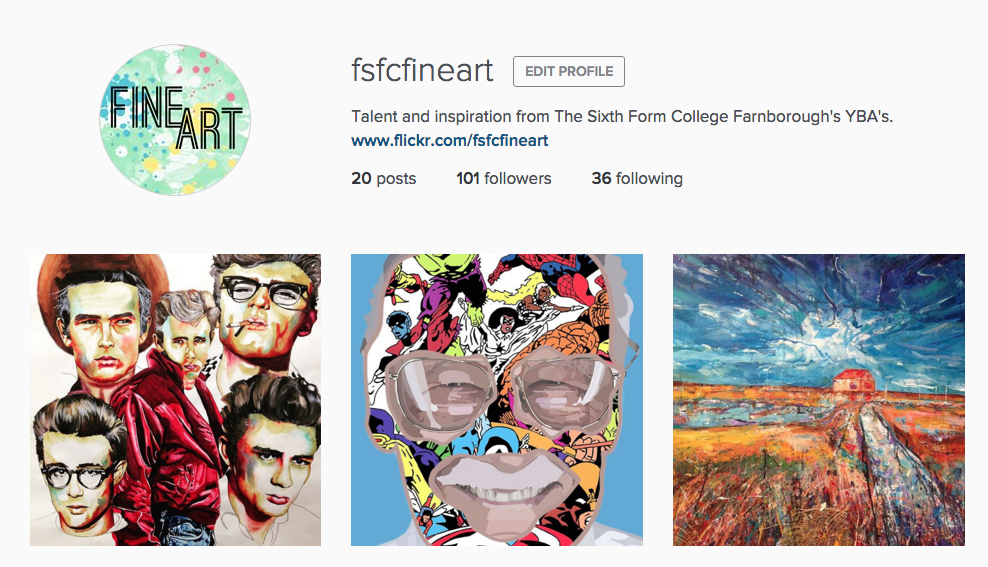

Instagram was initially recommended by one of my students and after a few discussions in class I found that several of my students were already using the social media site for their own publication of artwork and gaining huge successes from it. About three weeks ago, I decided to try a new digital venture for the department and since launching our own page we already have over 100 followers. Our students have responded positively to the site and many have followed us - checking daily to see new ideas from fellow students in both AS and A2. Through hashtags we have been able to create an online following and draw attention to what we want people to look at. For example: #fsfcfineart, #studentartwork #expressivepainting, etc. Our page has also enabled us to find new artists and follow galleries for inspiring artwork for our students. Our students can then click on what we 'like' and within the past week some students have already approached me through our online signposting for artist research!


It makes me incredibly proud to see my students receive the attention they deserve and even prouder to see them independently critique and compliment one another's artwork. In turn, this positive praise gives my students more confidence within the classroom and successfully introduces them to new initiatives and links within the art world.

Now, I won't lie.. the above does take time and we try to post on each social media site at least once a week to keep our audience happy. All of the above sites have an App and once set up it is pretty quick to post something from your phone and access it without a computer. We even have our own QR codes within the classroom for students to access in lessons and we publicise these also on our course leaflets and next to paintings around the college (linking back to our Flickr account).


We'd love to digitally interact with other educational institutions so if you use a digital tool for the promotion of your student artwork then let us know by either following us or leaving a comment on the end of this blog post!
- Kirsty ❤

Wednesday, 28 May 2014

Digital: Pinterest, why I think all Art Teachers should be using it!


I've done a few posts on here over the last two years about Pinterest but having recently given a talk at a staff training event I realised things have changed in two years! Pinterest has some new functions and I have some more articulate ways of explaining why I think Pinterest's is so great and why I think all Art Teachers should be jumping on the Pinterest Bandwagon! 

Social Networking tool/Digital
It's digital! (obviously, I hear you cry!) but that has a fair few benefits for us as Art teachers:
  • It can be submitted in that format to your exam boards! Edexcel even have an article on it and we have experience of submitting it as part of student research for three years now. It has always been simple and painless and relatively well received (more so now that it is more widespread!)
  • You can save money on printing and time on presenting (for you or students, however it works at your place) instead of printing out, cutting, sticking and hand writing around it, students can just send you the link to their account! We use the 3W approach that we use here on the blog with our students for annotating their boards
  • It's a great and easy way to effectively introduce a digital tool and a social networking tool into the classroom without it being a token gesture! I've always found making 'quizzes' and other smart board related tools largely geared towards exam based subjects. There's plenty of ways to get it used in class and outside, starter activities, collaborative boards between students or between staff and students, homework tasks, a main tool for a full research based, etc! 
  • In my experience students don't see it as a chore, they actively engage with it! They don't just use it in a professional manner for their project work, they are using it for personal interest too, a fact which I think should be celebrated! 
Digital Literacy
I love this term. Digital Literacy has been on the curriculum for a few years but in places I've worked it's never really been on the agenda, so to speak. This case study by Future labs highlights the key components of digital literacy, amongst them are collaboration, E-safety, the ability to find and select information, effective communication and creativity. Pinterest is a tool which you can use to develop all of these skills with students.
E-safety by creating your own boards to share with students you can navigate them to appropriate content and as part of the introduction to Pinterest with students it's worth cover things like spam accounts and how to spot them!
The ability to find and select information again you can kick start this process but then it's up to students. Pinterest will give them help with this suggesting relevant boards each time they pin but a key part of getting pinterest to work with your students is explaining the pin it button and getting them to pin straight from the source!
Effective communication students will need to come up with appropriate titles and a description to explain what their board is about and as I mentioned previously we use the 3W approach to aid them in annotating. They need to ensure that when another person views their boards that they understand the themes and messages they are trying to communicate! Another good activity is to help the develop stages of research through different boards. There can be an initial board with everything on and this can be narrowed down and selected from for later more considered boards, and so on!
Creativity, Pinterest is great to kick start a project! students boards can be filled with ideas from inspirational art and design work to mate

Secret Boards
I think this was my favourite addition and is an absolute asset when it comes to planning. For anyone else out there who likes to put together boards for things like exam topics, you may too previously remember spending the morning before you delivered the themes pinning away or delaying creating your boards till after you had delivered it but no more! When it launched there was a cap of just 6 boards but since mid February secret boards have gone unlimited! Woo-hoo! Now you can plan away and launch the boards exactly when you want them meaning you can plan terms ahead and pin ideas for future projects. 

Our Pinterest Accounts 
The thing we have found about Pinterest is that it's quite addictive once you get started! What we have also found is that what is relevant for I heart Teaching Art is not necessarily relevant for work and sometimes there's stuff we'd just like to pin for ourselves. The solution...multiple accounts. When we first used Pinterest at work we all worked at the same college and worked across several subjects. We also had a large cohort of BTEC students so we had one account with boards for different subjects and felt it was good for students from different disciplines to have access to a wide range of artists and designers. When me and Kirsty started at our new place we had much larger groups of students and were only teaching one subject (amazing!) and felt it would be best to provide them with a more specialist and detailed range of resources so we created individual pinterest accounts for our courses. We also like to pin our own bits and pieces so we have our own personal accounts (I'm a fan of pinning cooking, house inspiration, tattoos and things I'd like to knit). Check out the links below to see our different accounts:
Previous Posts
In case you're curious and want to look back at my previous posts about Pinterest you can check them here (remember one of them is 2 years old so it may be a little out of date!)
If you're not on Pinterest already what are you waiting for? Come and follow us on there!
- Claire ❤

Thursday, 15 August 2013

digital: Pinterest teachers hub


Who else is starting/getting on with their back to school planning? I know I've been starting to get on with it over the last few weeks doing little bits here and there. One of my favourite tools for planning is Pinterest, I've blogged about it on here before! I know there's lots of teachers out there using it and for good reason, it plays a really key role in my initial planning. I start by gathering worksheets, tutorials and inspiring artists and designers before putting together schemes of work and projects. Once I've done my final plans my boards are ready to be edited so that they are student friendly! Normally this just means re pinning so that it's in an order which matches how I plan to deliver the project. I also like making extension boards - additional artists/designers and resources that students can use to complete independent research to extend their learning. I have found that Pinterest definitely engages a lot of learners with research that before they may have been less than interested in completing! 

Anyway enough about my thoughts, pinterest have picked up on the trend of teachers using it and this week they've launched a Teachers Hub. Unfortunately for us UKers it's in USA format but if you can work out the corresponding grades to year groups there's bound to be some inspiring stuff on there! There is also subject specific boards, classroom display ideas and education blog boards. You can read more about the Teachers Hub and the reasons behind it on the pinterest blog, here and it's well worth checking out the art contributor Donna's pinterest account she has an amazing amount of inspiring pins. Of course don't forget to check out our pinterest too!
- Claire ❤

Thursday, 23 August 2012

tutorial: august tutorial round up!

1. Amazing blanket stitch instructions by Purlbee, 2. How to make a cloud by Serena at The Farm Chicks (I seriously need to try this),  3. Anthotypes by alternative photography, 4. dip dye ribbons by ruffled, 5. making pom poms with a fork (adorable!) by Vivid Please, 6.  Pendulum Painting by Martha Stewart

For those of you who follow us on pinterest, you might have noticed that we have quite a large collection of tutorials pinned. Tutorials are probably my favourite thing to read, collect, pin and probably one of my favourite things about the internet in general! There's nothing cooler than sharing awesome ideas in this format, I love doing it myself and I love learning how to do something new from someone else!  Anyway I'm going to do a monthly round up of my favourite finds to share with you all - if you need a dose more than once a month though you can always swing by our tutorials board on pinterest!

- Claire ❤

Monday, 23 July 2012

digital: digital tools we love, part I

what we use in our department: flickr, pinterest, you tube and blogger

I'm a huge fan of digital 'tools' as I find they tend to be things which make my life easier and as a wonderful addition, make my students learning experience more exciting. Over the next few weeks my posts are all going to be 100% focused on digital, I'm going to discuss the stuff that has revolutionised my (teaching) life to give an insight into what I (and colleagues!) do and how it works and also to show how easily you can start using these things yourself! So to kick start the digital focus I'm going to run through the easy to access stuff that you can whizz over and check out. 

Our departments journey into the digital world began with blogging. I turned up eager, excited, new to teaching and a long term blogger and thought hey! let's do this! It was received initially with a kind of hesistance but has thankfully evolved into a key part of our department used by staff and students alike. In a moment which I can only retrospectively describe as sheer craziness I created separate course blogs for each course (we had 6 at one point!) upon realising that was a bit nuts, I merged all 6 into one combined blog: Coulsdon Visual Arts. We use it to post about student work and exhibitions and artists our students may find inspiring - it's essentially a quick and visual way to share resources that allows our students to start becoming more independent with their learning. For example, it's really great being able to direct students to our own archives of artists, textile/fashion designers, graphic designers and photographers to kick start research for new projects. It also allows us to advertise the awesome stuff we've got going on to the world and/or potential new students, in fact I'm sure I could bore you senseless with all the things I think it's great for but those are the big players! 

Blogging sort of opens you up to getting involved with all the other social media stuff that's out there. A lot of the stuff we get involved with often happens because one of us is already using it for our own work or because we're pretty geeky when it comes to the net so we've read up on someone else using it and thought it sounded awesome.   The other key things we use are flickr, Pinterest and  you tube. Each tool plays a different role,  Flickr  for example we use simply because it allows us to share photos easily! We find it's one of the best ways to share our images with our own students as they can access it both at college and at home. You Tube on the other hand allows us to upload video tutorials - something which I'll post more about over the next few weeks. Finally, Pinterest, I've already posted about pinterest actually, but I cannot stress enough how incredible it's been, you literally would not believe the amount of annotated research work that has come out of some of my AS Graphics students since we introduced it, it's incredible! Also I'm just so much more into visual planning as a starting point, this summer I've started each of my schemes of work for next year with a pinterest board -  it's great because I can share it with colleagues and once I start the projects I can direct my students straight to the board so they can get a quick visual overview of the project. 

Phew! Well I hope that's given you a bit of an overview and a few things to go and explore. So what else? Well coming up over the next few weeks I'll be getting into a bit more of the nitty, gritty stuff:
  • Blogging: How to create your own, lesson blogs, student blogs and more!
  • Video: tutorials, how to's, recorded assessment, etc. 
  • Gadgets/software aka things that make my teaching life simpler 

and more! 
- Claire ❤

Monday, 25 June 2012

Project idea: Pinterest


Pinterest is brilliant! I use it constantly - it's essentially a digital pinboard and I find it has completely replaced 'bookmarking' a web page. No longer will I spend time hunting through my bookmarks trying to remember what I called that website! Pinterest is my visual bookmarker! At I heart teaching art we collaboratively update our pinterest and we also have a separate one for college which we use to share resources with students and also to share ideas with each other - I use it when I'm beginning to put together a new scheme of work, like my BTEC L2 Portrait project for the Autumn term which I've been working on this week. 

Anyway, that's a bit about what we use it for and why, so what's the project idea? If you have a look at our college pinterest you'll notice 9 quite distinctive 'Graphics' boards. Looking at a range of artists and techniques is key for our students so I set my AS Graphics class an independent research task using pinterest! Each student had to create an account, research artists/designers in the 9 different materials/techniques categories, 'pin' at least 5 images for each category and add a personal response and explain the 3W's who made the work? what materials/techniques have they used? why was it made (i.e. exhibition, personal work, etc.)? to the description of each pin. 

I think it's a great project idea and our students responded really well. It's a quick, innovative and exciting way to engage students with contextual research, students can link up with each other and staff to share ideas and inspiration (I've found myself repinning some brilliant things my students have found!) and it's very time effective - instead of students wasting time selecting, printing and sticking down images onto a 'moodboard' type page they are directing time at more purposeful research and annotating all the images they find! 

Pinterest projects have a lot of potential - I'm already making plans for projects for gathering secondary imagery, initial research for essays, idea generating techniques and just looking forward to seeing the way that it evolves as my students continue to use it throughout their A2 year. I'll share any other projects I do with pinterest and I'd love to hear ideas and feedback from anyone else who tries it too! 
- Claire ❤

Thursday, 21 June 2012

networking


We're slowly making progress with the i heart teaching art project and today we sorted out our twitter and facebook pages so do follow or like us if you do in fact like us! We're also on You Tube and we'll be posting video tutorials and more over the next few months so watch this space, it's all starting to come together! You can find our different pages by clicking on the buttons above! We're also on pinterest!

note: these beautiful sketchy icons are by Chris on spoon graphics -  you can find out more about them, here.